
 +91-7873-222-000
 WhatsApp

 Book Appointment
Computer Vision Syndrome Treatment in Delhi: Effective Digital Eye Strain Treatment
Headaches by evening, blurry vision after long screen hours, eyes that feel dry and tired by lunchtime — if this sounds familiar, you're likely dealing with Computer Vision Syndrome (digital eye strain). At Save Sight Centre, our team provides accurate diagnosis and effective Computer Vision Syndrome treatment in Delhi, addressing both the underlying cause and the daily habits driving your discomfort with a proper digital eye strain treatment plan.
🔎 Quick Answer: Computer Vision Syndrome Treatment in Delhi
Computer Vision Syndrome (CVS), also called digital eye strain, is a group of eye and vision problems caused by prolonged use of computers, tablets, and smartphones — including headaches, blurred vision, dry eyes, neck pain, and difficulty refocusing. It isn't one specific disease but a collection of symptoms triggered by reduced blinking, screen glare, poor ergonomics, and uncorrected refractive errors. At Save Sight Centre, a NABH and ISO accredited hospital in Delhi, treatment starts with a comprehensive eye evaluation to rule out or correct underlying issues, followed by practical relief measures — computer glasses with blue light filtering, the 20-20-20 rule, proper lighting and screen positioning, and dry eye management where needed.
What Do You Need to Know About Computer Vision Syndrome?
Computer vision syndrome (CVS), also called digital eye strain, affects an estimated 66% of regular screen users worldwide and 73% of patients seen at a North Indian tertiary eye hospital.
Common symptoms include eye strain and heavy eyelids, dryness or burning, blurred or double vision, headaches, light sensitivity, and neck or shoulder pain.
Effective treatment combines a comprehensive eye exam, lubricating eye drops for dry eyes, the 20-20-20 rule, ergonomic screen positioning, and — where needed — a computer-specific eyeglass prescription.
People who spend two or more continuous hours on a computer or digital device daily face the highest risk — especially students, IT and software professionals, content creators, and remote/hybrid workers.
Blue light-filtering glasses may improve comfort for some people, but current research shows mixed and limited evidence that they meaningfully reduce digital eye strain on their own.
Save Sight Centre is led by Dr. Rajeev Jain, with 25+ years of clinical experience and 3,50,000+ eyes cared for, at an NABH and ISO accredited facility opposite Adarsh Nagar Metro Station.
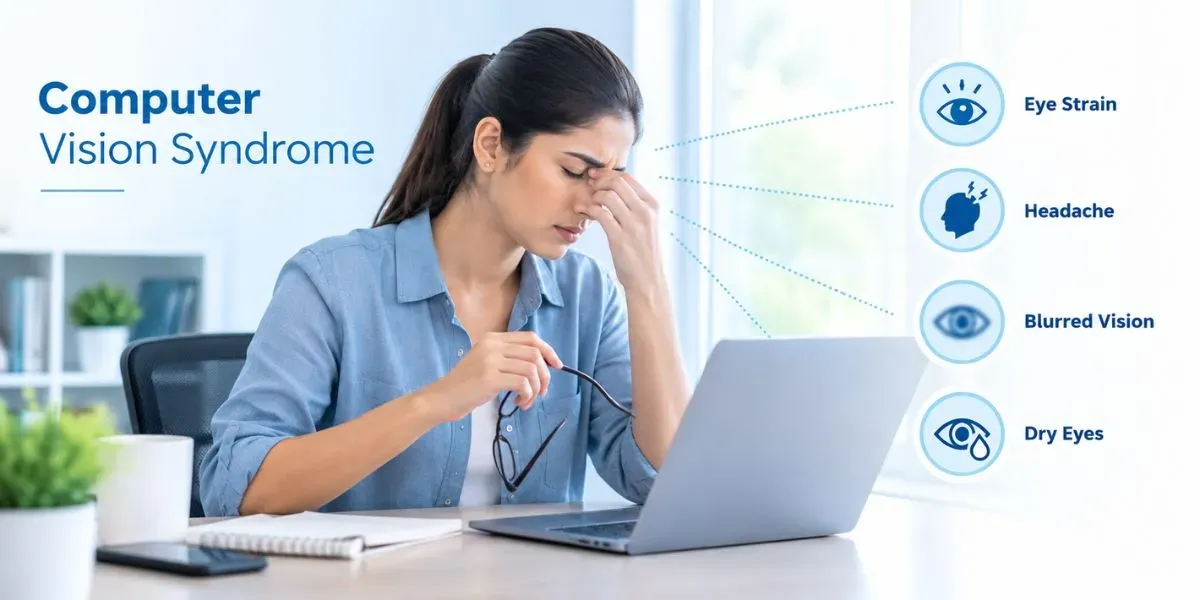
What Is Computer Vision Syndrome (Digital Eye Strain)?
Computer Vision Syndrome (CVS), also called digital eye strain, describes a group of eye and vision-related problems that result from prolonged use of digital devices — computers, tablets, e-readers, and smartphones. It's become extremely common, with the average person now spending many hours a day on screens, whether at work, school, or home.
Viewing a screen is fundamentally different from reading a printed page. Screen text is often less precisely defined, contrast is lower, and glare or reflections make focusing harder. Viewing distances and angles for screens also differ from typical reading positions, placing extra demand on your eyes' focusing and movement systems. On top of this, people blink significantly less often while looking at a screen, which lets the eye's surface dry out faster than usual.
CVS discomfort generally increases with the amount of screen time, and even minor, uncorrected vision problems can significantly worsen symptoms — which is why a proper eye evaluation, not just generic tips, is often the fastest path to relief.
What Are the Symptoms of Computer Vision Syndrome?
CVS symptoms tend to build gradually through the day and often ease overnight, only to return with the next day's screen use:
⚠ Watch for these warning signs:
- Headaches, especially around or behind the eyes
- Blurred vision, particularly by the afternoon or evening
- Dry, irritated, or burning eyes
- Neck, shoulder, or upper back pain from screen posture
- Eye fatigue or a heavy, tired feeling in the eyes
- Difficulty refocusing when looking away from the screen
- Double vision or increased sensitivity to light
- Occasional dizziness or vertigo during long screen sessions
Who is most likely to experience CVS?
The following are the persons who may have this eye problem:
- Desk workers and IT professionals with 6+ hours of daily screen time
- Students attending online classes or doing extensive digital coursework
- Anyone with uncorrected vision problems or an outdated glasses prescription
- People working with older or low-resolution monitors
- Adults over 40, as presbyopia adds extra strain to near-screen focusing
What Causes Computer Vision Syndrome?
CVS results from a combination of visual demands, environmental factors, and sometimes underlying eye conditions:
Reduced Blinking
People blink significantly less often while focused on a screen, letting the tear film evaporate faster and causing dryness and irritation.
Screen Glare, Contrast & Flicker
Unlike printed text, screens add contrast variation, flicker, and glare — all of which make the eyes work harder to maintain a clear, comfortable focus.
Uncorrected Refractive Errors
Needing glasses but not wearing them, or wearing the wrong prescription for screen-viewing distance, significantly worsens computer eye strain.
Poor Ergonomics & Screen Distance
Sitting too close to the screen, poor posture, or an incorrectly positioned monitor all add unnecessary strain to your eyes and neck.
Improper Lighting
Excessive brightness, glare, or reflections from overhead lighting are a leading contributor to digital eye discomfort in office settings.
Presbyopia (After Age 40)
As the eye's natural lens becomes less flexible with age, the ability to comfortably focus on near screens declines, making CVS symptoms more pronounced.
What Tests Are Done Before Computer Vision Syndrome?
Refraction Test
Precisely measures your current glasses power, identifying any uncorrected or under-corrected refractive error contributing to your strain.
Binocular Vision & Focusing Assessment
Checks how well your eyes team together and focus at near distances, ruling out an underlying eye-teaming or accommodative problem.
Dry Eye & Tear Film Evaluation
Assesses tear quality and quantity, since reduced blinking during screen use often leads to dry eye disease that mimics or worsens CVS symptoms.
Slit-Lamp Examination
A detailed microscopic exam of the front of the eye, checking for surface irritation, redness, or other contributing conditions.
Accommodation Testing
Measures how efficiently your eyes can shift and sustain focus, particularly relevant for evaluating age-related changes like presbyopia.
Ergonomic & Screen-Habit Review
A discussion of your workstation setup, screen distance, and typical daily screen hours helps tailor practical recommendations alongside any medical treatment.
Do Computer Glasses and Blue Light Filters Actually Help?
Computer glasses are optimised specifically for screen-viewing distance rather than distance or standard reading vision, and often include filters designed to reduce exposure to blue light from screens:
Why the lens design matters
Your regular distance glasses or reading glasses aren't optimised for the typical arm's-length screen distance. Computer glasses are specifically calibrated for this middle range, reducing the extra focusing effort your eyes would otherwise need.
What blue light filters do
These lenses reduce the amount of blue-spectrum light reaching your eyes from screens, which some people find eases visual discomfort and glare sensitivity during long screen sessions.
Computer glasses work best as part of an overall approach — correcting any underlying refractive error, combined with good screen habits like the 20-20-20 rule, rather than as a standalone fix.
How Is Computer Vision Syndrome Performed Step by Step?
Lifestyle & Ergonomic Changes — Simple, consistent daily habits can meaningfully reduce CVS symptoms, often without any medical intervention needed.
The 20-20-20 Rule
Every 20 minutes, look at something 20 feet away for 20 seconds. This simple habit gives your focusing muscles a genuine break throughout the day.
Conscious Blinking
Deliberately blinking fully and more often keeps the eye's surface properly moistened, directly countering the dryness that screen use causes.
Workstation & Lighting Setup
Position your screen at a comfortable distance and angle, reduce glare and overhead brightness, and take regular posture breaks to relax neck and shoulder tension.
Medical & Optical Treatment — When lifestyle changes alone aren't enough, or an underlying eye condition is contributing, these options provide more targeted relief.
Updated Glasses Prescription
Correcting even a small, previously uncorrected refractive error often meaningfully reduces screen-related eye strain.
Computer Glasses
Specially designed lenses, sometimes with blue-light filtering, optimised specifically for typical screen viewing distances rather than distance or reading vision.
Dry Eye Management
Lubricating drops or other dry eye treatments address the tear film disruption that's often a major, under-recognised contributor to CVS discomfort.
What Is the 20-20-20 Rule and Why Does It Work?
The 20-20-20 rule is the single most recommended habit for preventing digital eye strain, and for good reason:
Every 20 Minutes
Set a reminder or habit trigger to pause your screen work roughly every 20 minutes throughout the day.
Look 20 Feet Away
Shift your focus to an object at least 20 feet (about 6 metres) away — a window view, a distant wall, anything beyond arm's reach.
For 20 Seconds
Hold that distant focus for a full 20 seconds, allowing your eye's focusing muscles to genuinely relax before returning to near work.
This works because sustained near-focus keeps your eye's focusing (accommodative) muscles constantly engaged. Regularly shifting to distance vision gives those muscles brief, genuine relief throughout the day, reducing cumulative fatigue.
Computer Vision Syndrome vs Dry Eye Disease: What's the Difference?
These two conditions overlap significantly and often occur together, which is why they're commonly confused:
| Basis | Computer Vision Syndrome | Dry Eye Disease |
|---|---|---|
| Primary Trigger | Prolonged screen/near-work use | Reduced or poor-quality tear production |
| Key Symptoms | Headache, blur, fatigue, dryness | Burning, grittiness, redness |
| Timing of Symptoms | Worsens through screen use | Can occur regardless of screen use |
| Relation | Can cause or worsen dry eye | Can worsen CVS symptoms |
Primary Trigger
Key Symptoms
Timing of Symptoms
Relation
What Happens If Computer Vision Syndrome Is Left Untreated?
CVS itself isn't a disease and doesn't cause permanent eye damage, but ignoring it consistently can affect your comfort and daily function:
Chronic Dry Eye
Persistently reduced blinking during long-term untreated CVS can contribute to ongoing dry eye disease that outlasts individual screen sessions.
Reduced Work & Study Productivity
Persistent headaches, blurred vision, and fatigue make it harder to concentrate and perform well during screen-based work or study.
Chronic Neck & Shoulder Pain
Poor screen posture, sustained over months or years, can contribute to persistent musculoskeletal discomfort beyond just the eyes.
Delayed Diagnosis of Underlying Conditions
Assuming symptoms are "just" CVS without an eye exam can delay diagnosis of an uncorrected refractive error or dry eye disease that needs its own specific treatment.
How Much Does Computer Vision Syndrome Treatment Cost in Delhi?
Cost depends on what your evaluation reveals — from simple lifestyle guidance to updated glasses or dry eye treatment:
| Computer Vision Syndrome Service | Cost |
|---|---|
| Digital Eye Strain Evaluation | Consultation charges apply |
| Computer Glasses (Custom Lenses) | On assessment |
| Dry Eye Treatment (if needed) | On assessment |
How Much Does Computer Vision Syndrome Treatment Cost in Delhi?
*Cost depends on your specific diagnosis and whether updated glasses or dry eye treatment is recommended. Consultation and diagnostic test charges apply separately. Confirmed pricing is shared after your evaluation. No-cost EMI is available.
Who Should You See for Computer Vision Syndrome in Delhi?
Getting real relief starts with an accurate diagnosis of what's actually driving your discomfort. At Save Sight Centre, digital eye strain evaluations are provided by:

Dr. Rajeev Jain
Dr. Rajeev Jain founded Save Sight Centre and has cared for over 3,50,000 eyes across more than 25 years of practice. He trained in ophthalmology at Guru Nanak Eye Centre (affiliated with Maulana Azad Medical College, Delhi), later served as professor of clinical studies at the University of Adelaide, Australia, and is an elected governing council member of the Vitreoretina Society of India (VRSI).

Dr. Shuchi Gupta
Dr. Shuchi Gupta is a Delhi-based eye specialist trusted for cataract surgery, LASIK, glaucoma treatment and anterior segment care. With 20+ years of clinical experience — including senior residency at a busy government hospital and practice at Venu Eye Institute, Delhi — she combines surgical precision with clear, patient-friendly communication.

Dr. Ankit Malhotra
Dr. Ankit Malhotra is a Delhi-based eye specialist trusted for cataract surgery, LASIK and anterior segment surgery. Trained at Maulana Azad Medical College (MAMC), Guru Nanak Eye Centre and Dr. Baba Saheb Ambedkar Medical College, he combines rigorous academic grounding with a calm, patient-first approach to eye care at Save Sight Centre.
Frequently Asked Questions About Computer Vision Syndrome
The most effective computer vision syndrome treatment combines an accurate eyeglass or computer-lens prescription, lubricating eye drops for dryness, the 20-20-20 rule, and ergonomic screen positioning. At Save Sight Centre, our ophthalmologists tailor this combination after a comprehensive eye exam, since the right mix depends on whether your symptoms stem from dry eyes, focusing strain, or an uncorrected refractive error.
Computer vision syndrome usually eases within a few hours to a few days once you reduce continuous screen exposure and adopt habits like the 20-20-20 rule, though symptoms return quickly if screen habits don't change. At Save Sight Centre, we generally recommend a follow-up review within two to four weeks if dryness, headaches, or blurred vision haven't noticeably improved.
Yes, eyes recover well from typical screen-related strain and dryness once you rest them and follow proper eye care habits, and most patients seen at Save Sight Centre notice clear improvement within days. Long-standing untreated dryness or an uncorrected prescription can cause more persistent discomfort, which is why our team recommends an eye check-up rather than waiting it out indefinitely.
Sleep plays an important role in easing digital eye strain because it allows your eyes' surface and focusing muscles to rest and rehydrate overnight. Doctors at Save Sight Centre often see faster symptom relief in patients who pair 7–8 hours of sleep with reduced screen use before bedtime, though persistent symptoms despite good sleep are still worth getting examined.
For quick relief, follow the 20-20-20 rule, use preservative-free lubricating eye drops, and adjust your screen's brightness and distance immediately. For longer-lasting relief, Save Sight Centre recommends a comprehensive eye exam to rule out an uncorrected refractive error or dry eye disease that over-the-counter measures alone won't fix.
Blue light glasses may improve comfort for some people, but current research shows mixed and limited evidence that they meaningfully reduce digital eye strain on their own. At Save Sight Centre, we treat them as an optional comfort measure rather than a primary treatment, focusing first on accurate refraction, screen ergonomics, and dry eye management.
Computer vision syndrome itself does not cause permanent eye damage, since it's a functional strain response rather than a structural eye disease, and symptoms typically reverse with proper care. Save Sight Centre still recommends an eye exam if symptoms are frequent, because they can sometimes mask an underlying issue like progressing myopia or dry eye disease that needs ongoing management.
Preventing computer vision syndrome while working from home starts with positioning your screen about an arm's length away with the top at or slightly below eye level, taking a 20-second break every 20 minutes, and keeping the room well-lit without screen glare. Save Sight Centre also recommends an annual eye check-up for remote workers, since long uninterrupted screen hours at home often go unmonitored compared to an office setting.
See an eye specialist if digital eye strain symptoms like blurred vision, headaches, or dryness last more than a few days despite basic precautions, or if your vision seems to be worsening, since these can indicate an uncorrected refractive error or dry eye disease. Save Sight Centre recommends a comprehensive eye exam for anyone with daily screen-related discomfort rather than relying on home remedies alone.
Yes, computer vision syndrome and digital eye strain refer to the same group of symptoms caused by extended screen use, and eye care professionals, including the American Optometric Association, use the terms interchangeably. Save Sight Centre uses both terms on this page since patients commonly search using either one.
Ready to Book Your Computer Vision Syndrome Consultation?
Book your consultation at Save Sight Centre, Delhi. Our expert team will help you understand your condition, recommend the right treatment and guide you through every step.